RepoDex

English | 简体中文
RepoDex (RepositoryIndex) aggregates repository indexes into a cross-repository, cross-branch fuzzy file search system, built on GitHub Actions, Cloudflare Workers, and a React + Vite + Kumo frontend.
- Try it online (demo data is fictional; the search logic is the same as production): RepoDex Demo
- Blog post: 项目介绍-RepoDex
The project is designed to be easy to configure and free to run: in normal use you will stay far below the free tiers of GitHub Actions and Cloudflare, so you can deploy it with confidence and no billing concerns.
Why RepoDex
Over time, developers accumulate many repositories on GitHub — code, documents, resources. GitHub itself has no global file search across repositories and branches, which makes finding a file painful. For Chinese users it is worse: many filenames are Chinese, and GitHub does not support pinyin fuzzy search.
RepoDex fills that gap with a cross-repository, cross-branch fuzzy search system to make file retrieval on GitHub efficient.
What it looks like
Mobile-friendly
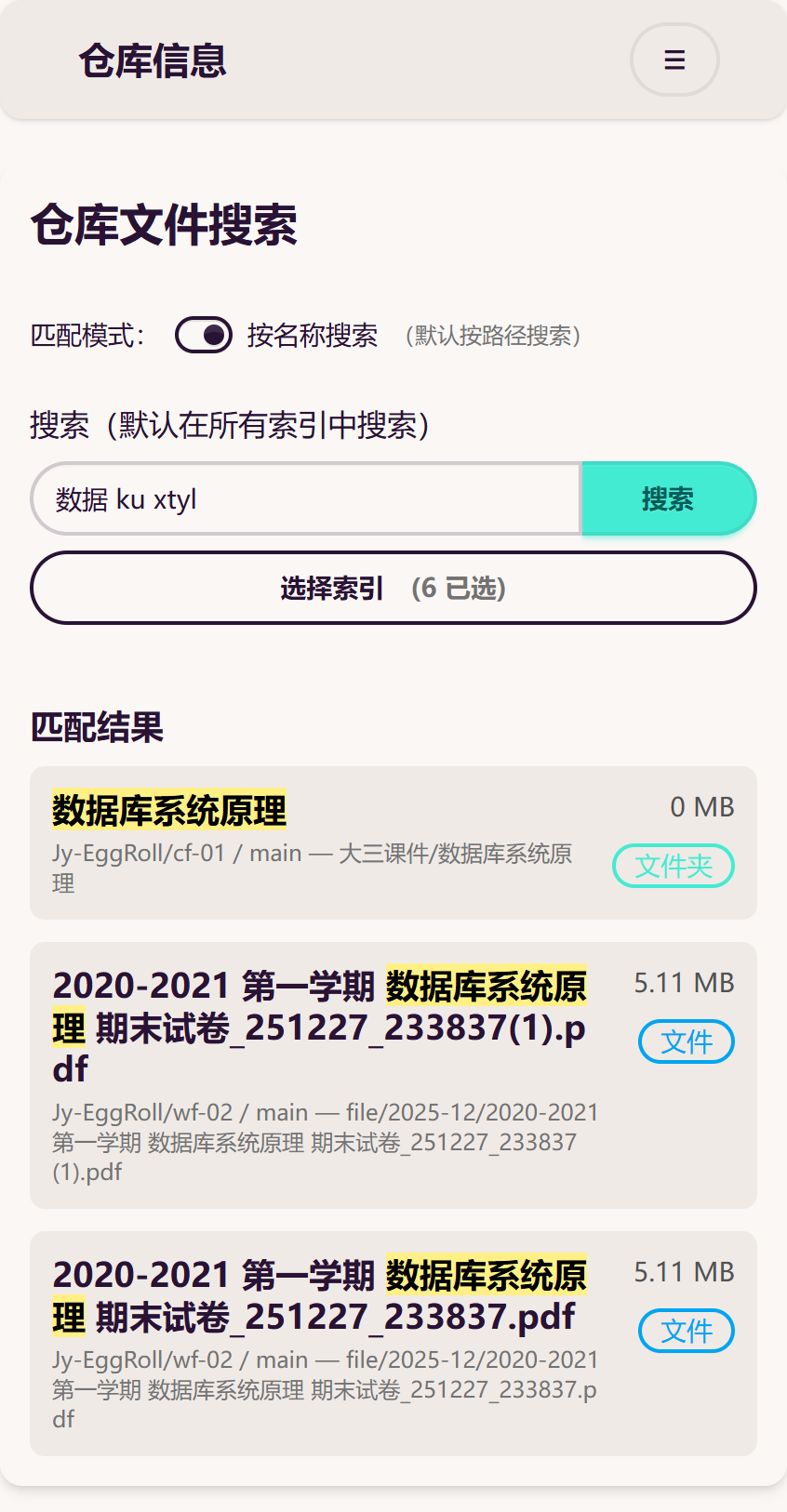
The screenshot above uses “Search by name” — note how English, Chinese, full pinyin, and pinyin initials all match.
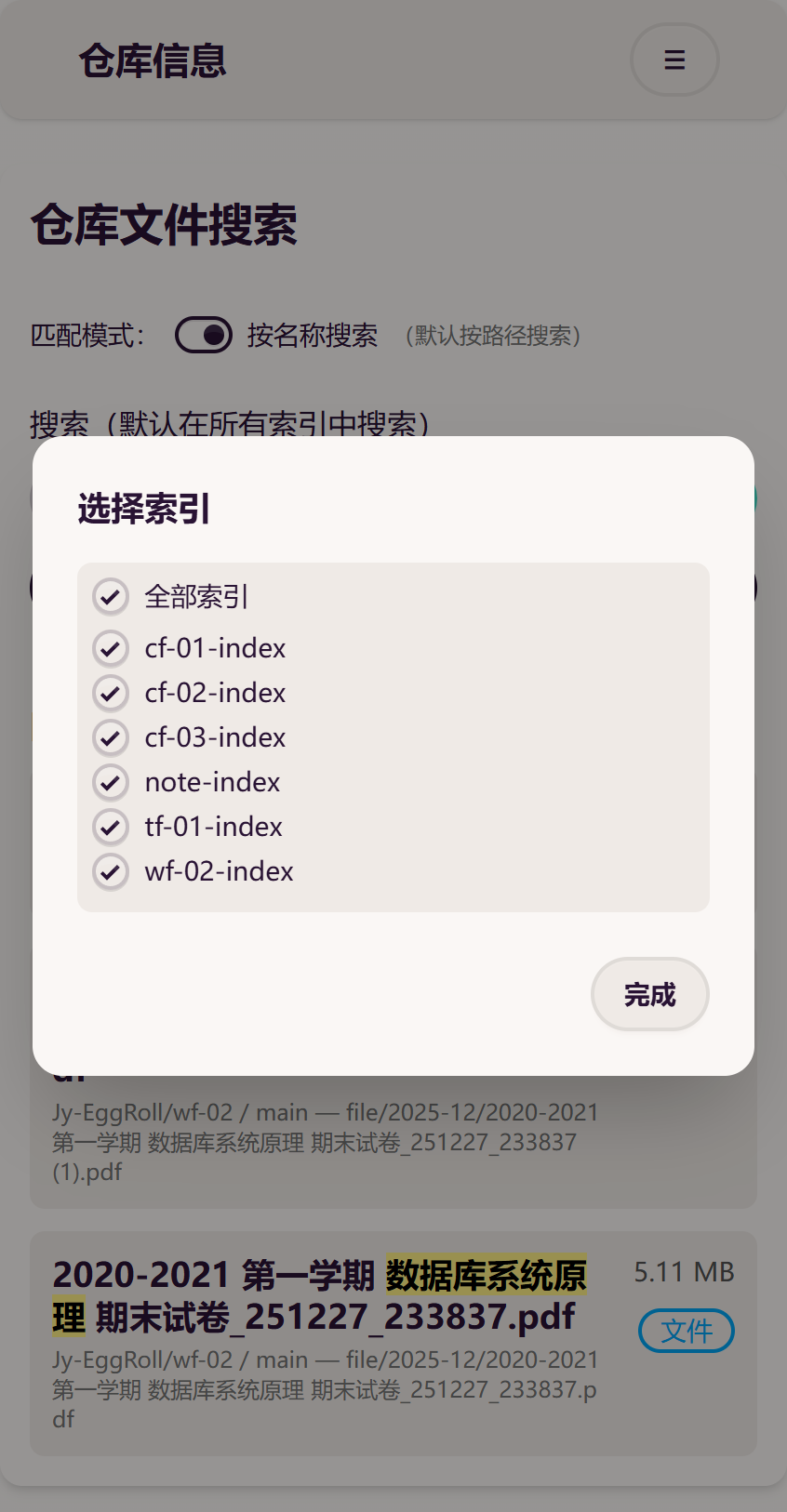
Indexes can be selected (all selected by default). The dialog filters index names live and offers select all / invert / clear in one click; changing the selection re-searches immediately when a keyword exists. Search is manually submitted (Enter or the button), at most the first 100 results are shown, and huge matches are scored only up to the first 1000 entries with an approximate total — so requests never time out.
Clean wide-screen layout
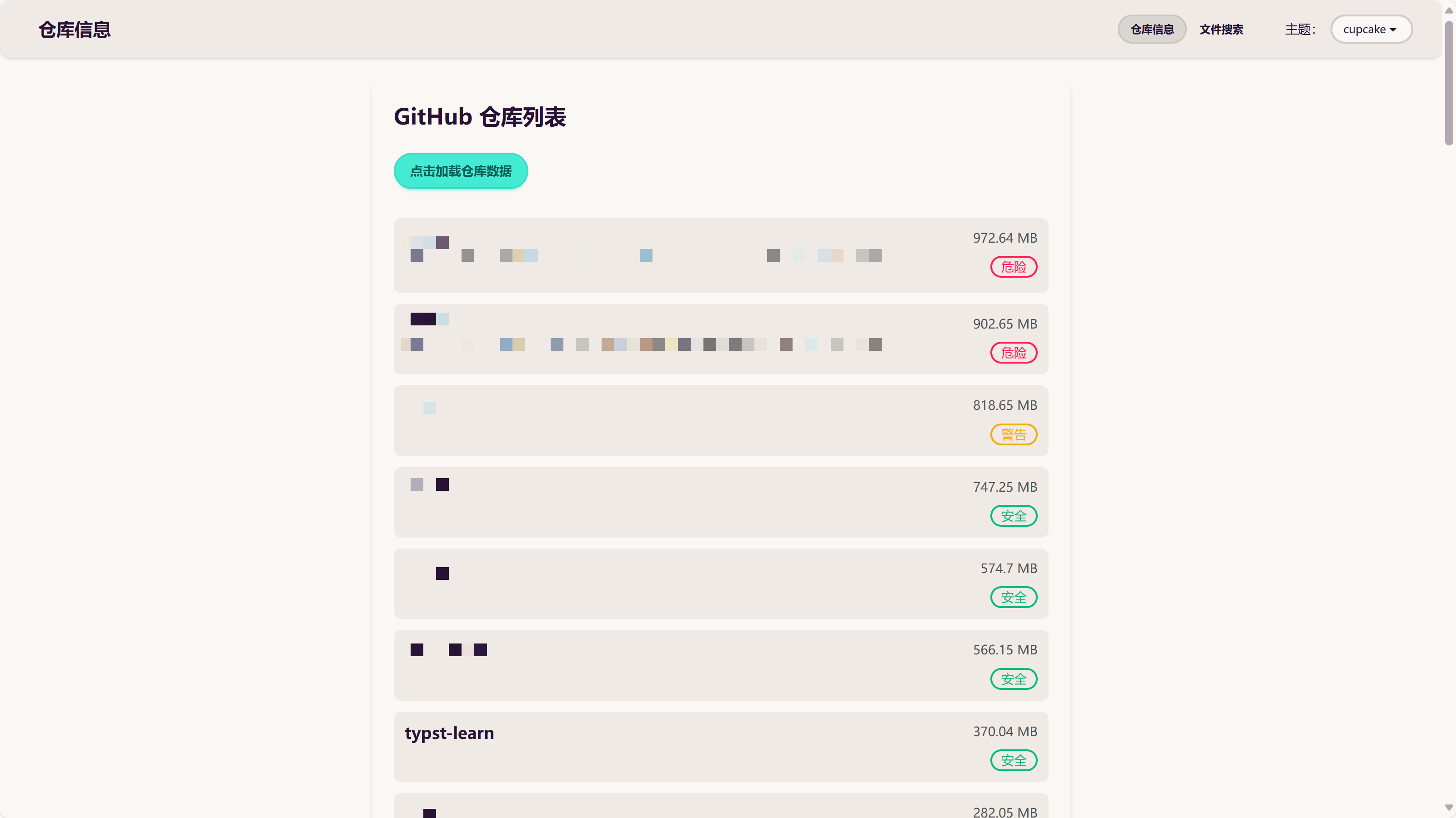
Repository risk badges: >900MB danger, 800–900MB warning, <800MB safe. You should not keep repositories larger than 1GB — there are many reasons, which we won’t get into here.
Other highlights
- Repositories and files link straight to GitHub.
- Files from all branches are searched by default (determined by the index).
- Three theme modes (follow system / light / dark; defaults to follow system, and a manual choice is remembered).
- Bilingual UI — English / 简体中文 — auto-detected from the browser, switchable manually, and the choice is remembered. All UI strings are wrapped through the l10n layer (VS Code l10n style: English source strings as keys, bundles in
/l10n).
Deployment
All you need is one Cloudflare account (no credit card required). Five steps, six secrets total — overview first (details in each step):
| Secret | Where to set | Purpose |
|---|---|---|
CF_ACCOUNT_ID |
This repo, Actions secrets | Cloudflare account ID (used by the KV API) |
CF_NAMESPACE_ID |
This repo, Actions secrets | The KV namespace central indexing writes to (must match the Worker’s binding) |
CF_API_TOKEN |
This repo, Actions secrets | Writes to KV (needs Workers KV Storage write permission) |
REPOS_PAT |
This repo, Actions secrets | Reads repo file trees for central indexing (classic token, repo scope) |
USER / PSWD |
Worker variables (“secret” type) | Site login |
1. Fork and connect

If you find this project helpful, a star would be very much appreciated.
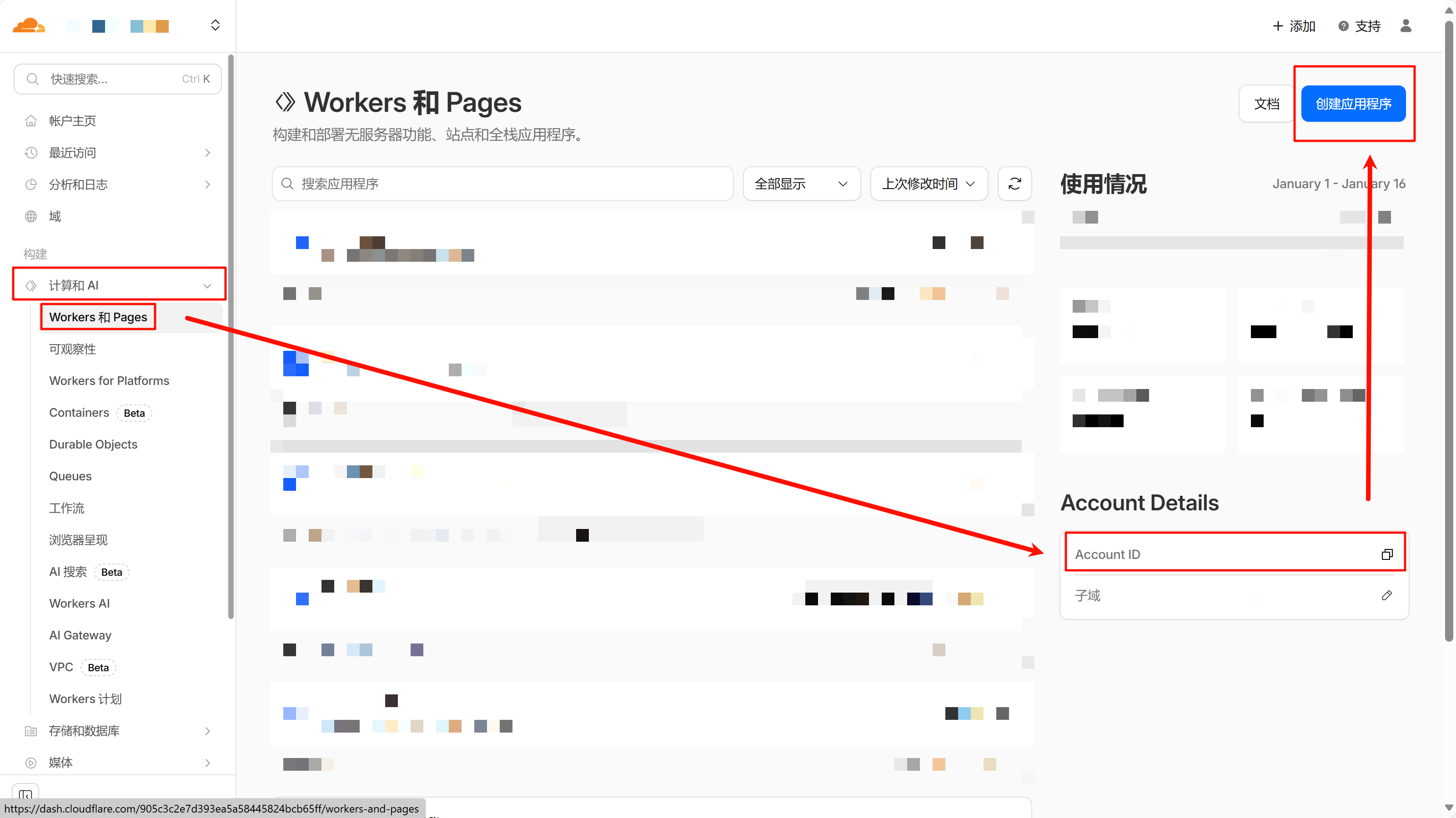
Copy the Account ID (= CF_ACCOUNT_ID).
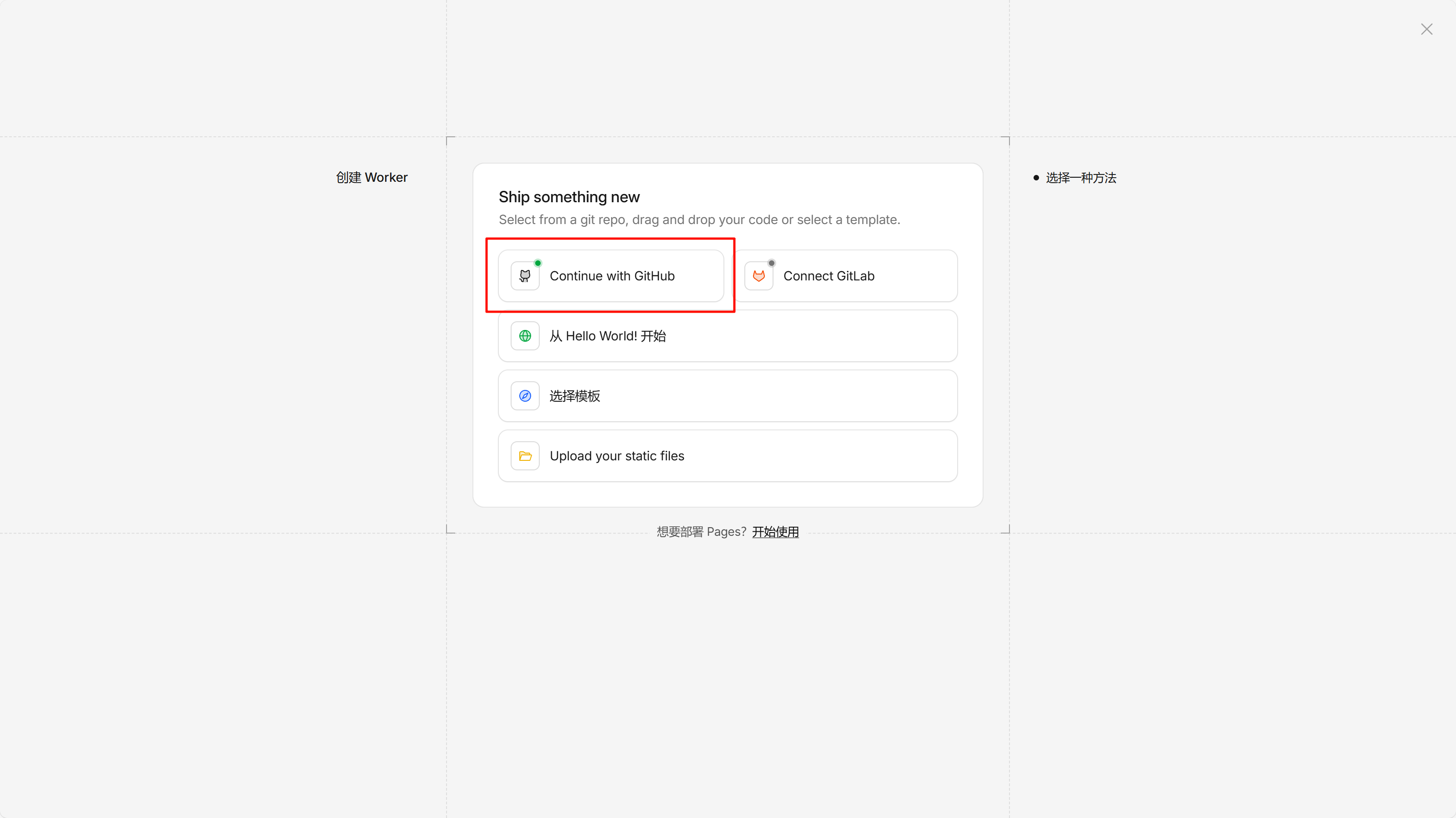
Connect to GitHub (grant authorization if asked) and pick your fork.
重要Build settings: build command
pnpm build, deploy commandnpx wrangler deploy. Deployment fails without the build command (the output directorydist/is already configured inwrangler.jsonc, no need to specify it).
2. On the Cloudflare side: KV and token
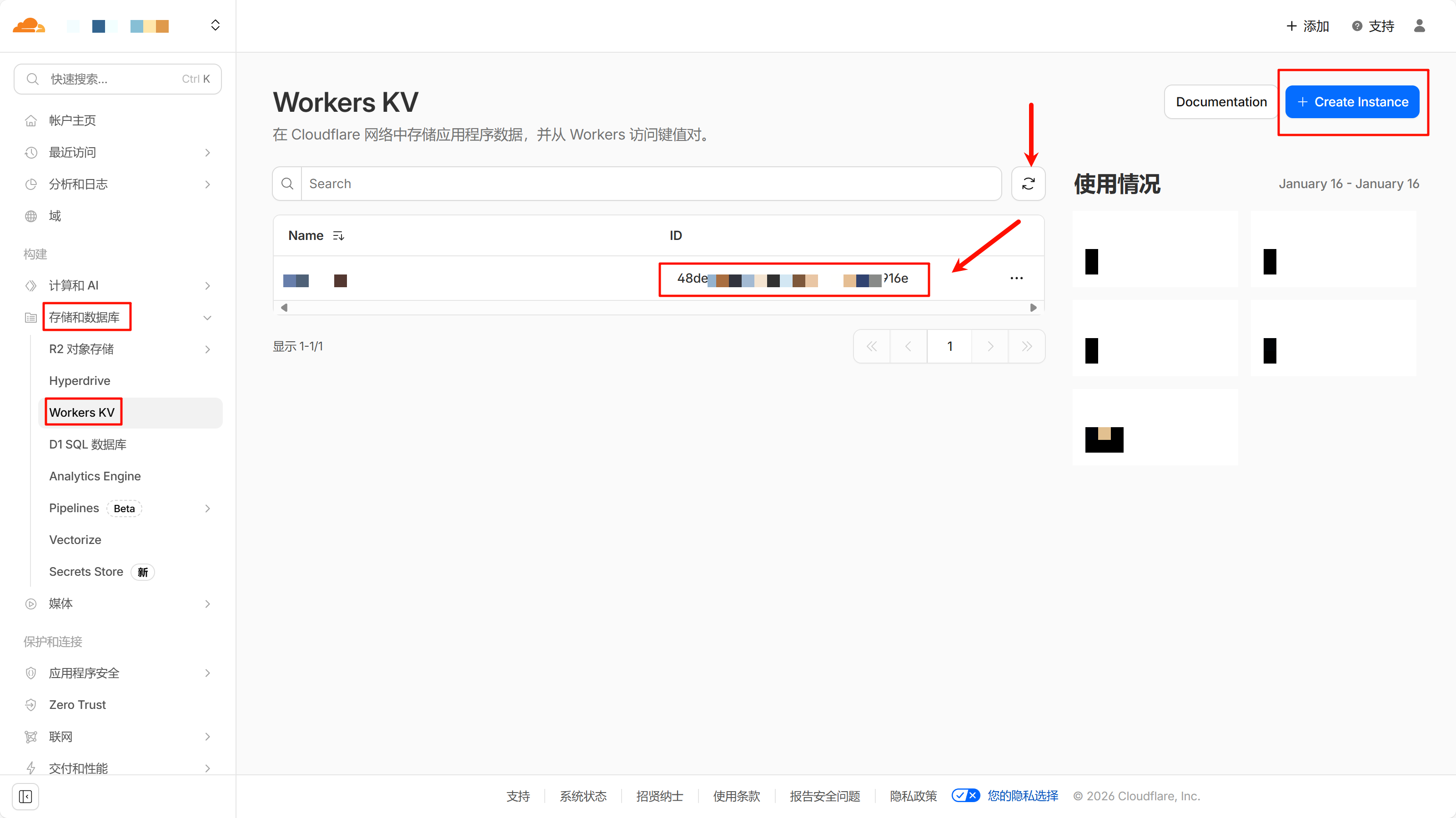
No need to create the KV namespace by hand. The kv_namespaces binding in wrangler.jsonc deliberately omits id (Wrangler’s automatic provisioning), so the first deploy creates the namespace for you, named after the Worker (repodex-repo-index-kv); later deploys reuse the same one instead of creating more. After deploying, open Workers & Pages → KV, find it by that name, and copy its ID (= CF_NAMESPACE_ID). Because the deploy runs in Cloudflare’s build environment (CI), Wrangler does not write the generated id back into the repo, so copy it into Actions secrets yourself.
备注
CF_NAMESPACE_IDmust be the same namespace the Worker is bound to — otherwise central indexing writes to A while the Worker reads B, and search keeps returningindex not ready. If the first deploy did not create the KV automatically, create one manually, then point the Worker’s KV binding at it from the Cloudflare dashboard, and keepCF_NAMESPACE_IDin sync. Do not write the ID back into the binding in this repo: that would bake an account-specific ID into every fork and defeat the deliberate omission ofidhere.
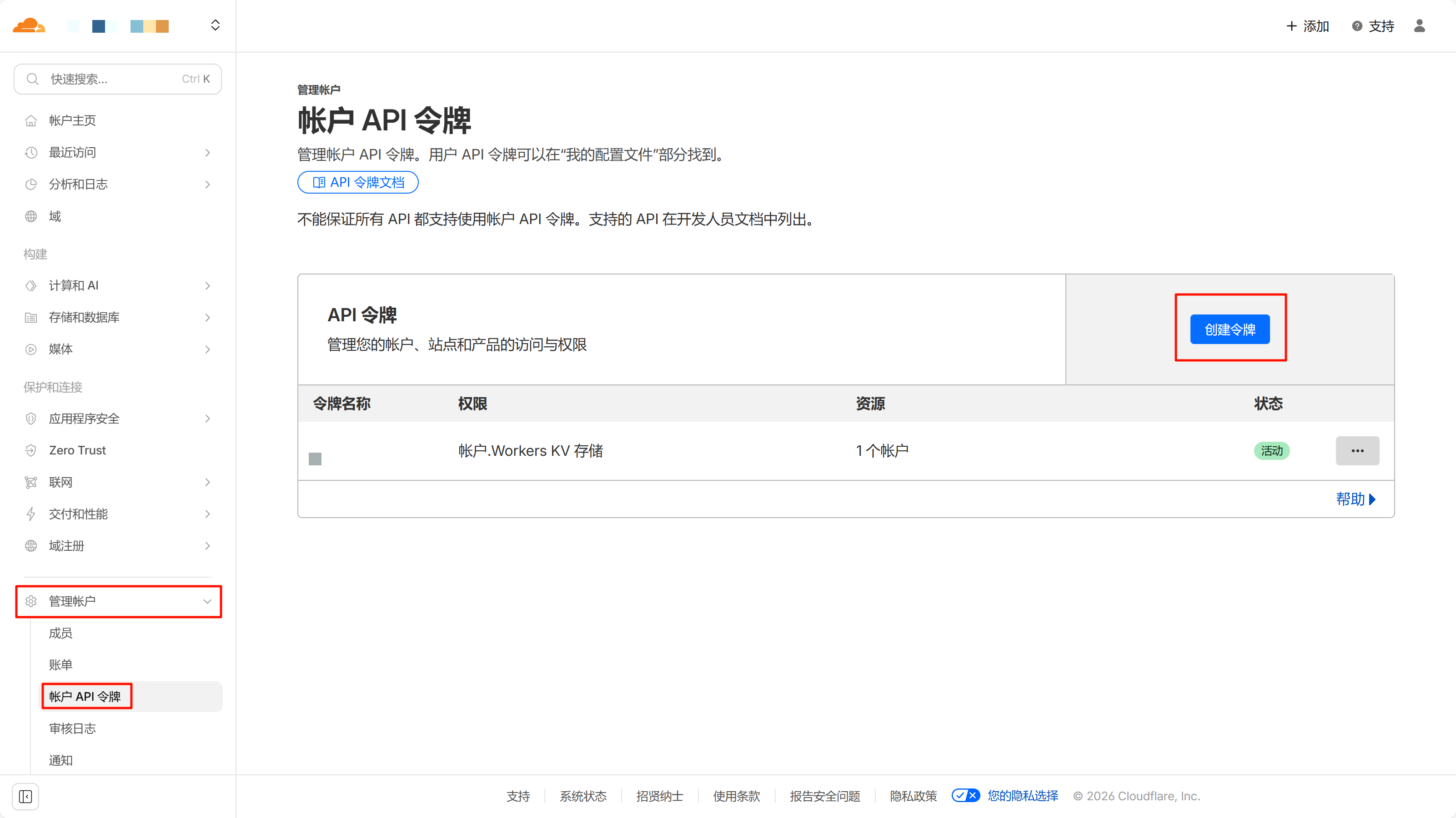
Create a token with the Workers KV Storage permission. It is shown only once (= CF_API_TOKEN) — store it safely.
注意A leaked token is a serious risk. Protect it carefully.
3. One token on the GitHub side
REPOS_PAT(classic token with thereposcope — fine-grained tokens cannot read collaborator repos): used by central indexing to read file trees and snapshot the repository list, covering personal repos, organization repos, and repos you are a collaborator on (private repos included). Create it at https://github.com/settings/tokens/new. Note: the default ActionsGITHUB_TOKENcan only read this repository, so cross-repo reads require this secret.
备注Some organizations block classic tokens (allow them in the org settings), and SAML organizations need a one-time token authorization. The classic
reposcope is read-write — store the token in Actions secrets only and rotate it periodically.
注意A leaked token is a serious risk. Protect it carefully.
4. Indexing (zero config)
The central workflow (.github/workflows/central-index.yml) generates every index — no per-repo configuration:
- Auto-discovery: scans all of your repositories — personal, organization, and collaborator — at minute 42 of every hour (deliberately off the hour, when GitHub runners are less contended; archived/disabled skipped), compares branch SHAs, and processes only changed repositories; the rest are skipped without any per-repo output.
- Blocklist: add one
owner/repoline torepos-blocklist.txtto exclude a repository. - Manual runs: Actions → Central Repository Index → Run workflow (optionally a single repo, or a dry-run preview that only reports counts).
- Cleanup: indexes of deleted repositories are pruned automatically. The first run backfills everything; later runs are incremental.
5. Worker secrets and a smoke test
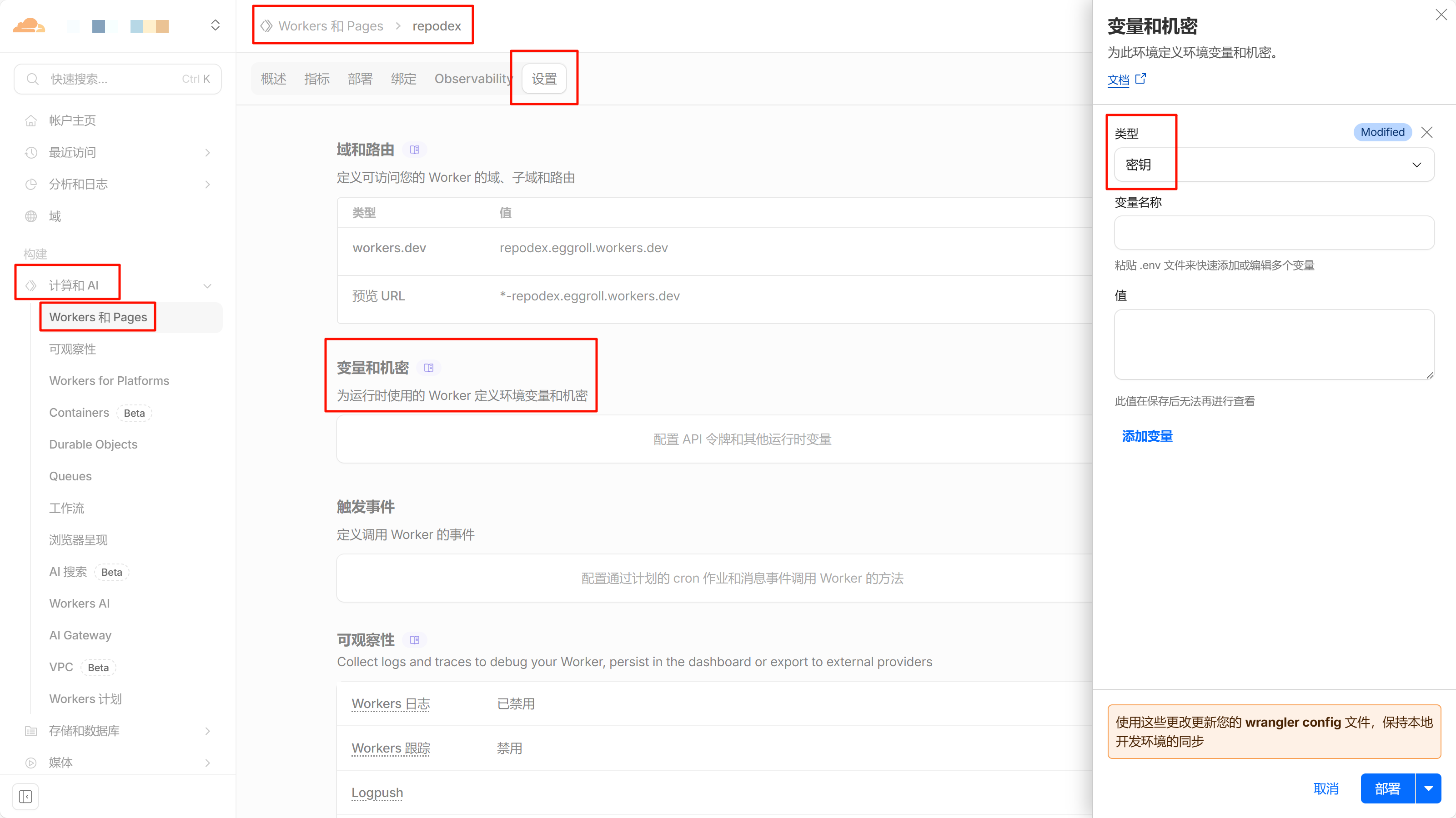
In Workers → Settings → Variables, add USER (username) and PSWD (password), both as “secret” type. Save, then deploy.
Smoke test: ① the home page loads and login works ② a keyword returns results ③ the index count matches the repository count. New repositories are discovered automatically — no redeploy needed. Note the repo list is an hourly snapshot (not real-time): renames and additions appear after the next sync.
Features
- Pinyin and fuzzy search: remember just a keyword from a filename and fuzzy-find any file. “Search by path” is on by default, so even when the keyword is not in the filename itself, a well-organized path still matches.
- Fast: Cloudflare Workers with Cloudflare KV make search quick. Cloudflare’s global CDN keeps the page itself fast, and Cloudflare-to-GitHub request latency is ideal.
- Strictly private: HTTPS-authenticated (Hono Basic Auth). Only someone who has both the username and password from the Cloudflare secrets can access it (usually just you). Rotate them in the Cloudflare dashboard whenever you like. Authentication guards the entire root path — without it, neither pages nor API assets are reachable, which eliminates the attack surface entirely.
Architecture
Central Index Workflow
An automation workflow in this repository (.github/workflows/central-index.yml + scripts/generate_index.mjs, zero dependencies, using the fetch built into Node 24).
At minute 42 of every hour (deliberately off the hour mark), or on manual dispatch, it scans all repositories, compares branch SHAs against the KV record, pulls file trees and merges the global index only for changed repositories, writes it into Cloudflare KV, and prunes indexes of deleted repositories (leftover keys from retired index formats are cleaned up too).
Search is served by a Durable Object (its 30s CPU budget replaces the 10ms Worker limit on the free plan), which loads index chunks in batches — corpus size no longer causes 503s.
KV key layout (all intentional):
__meta-plan— chunk manifest + repository list; the single source of truth the Worker reads for search and the index list{owner}/{repo}@{i}— per-repository index chunk (≤ 20,000 entries each; repositories are never mixed in a chunk)repo-info-cache— repository list snapshot, rewritten hourly by central indexing (the Worker only reads it)__meta-sha-table— branch SHA table for change detection
Internationalization
UI strings follow the VS Code l10n conventions: English source strings are the keys, and translations live in l10n/bundle.l10n.json (English identity map) plus l10n/bundle.l10n.<locale>.json (e.g. zh-cn). Components translate through i18next / react-i18next, configured for flat English keys and {0}-style placeholders; the browser language is detected automatically and a manual choice is remembered.
When you add or edit a visible string: wrap it with t("..."), add the key to every bundle, then run pnpm l10n:sort. The test suite enforces that all locales share the same key set with matching {n} placeholders.
Development
|
|
Run pnpm check before committing; CI (.github/workflows/check.yml) runs the same gate on push/PR.
Stats
Acknowledgments
- Cloudflare for Workers, Git integration, KV, and the free tier that makes this project possible.
- text-search-engine — a mature search engine with great compatibility and performance, supporting pinyin and fuzzy search.
- Hono — the fastest framework on Cloudflare, providing strict, secure authentication.
- Kumo — Cloudflare’s official React component library, providing consistent UI and accessibility.
- React, Vite, and Tailwind CSS v4 — the frontend build and styling foundation.
- i18next / react-i18next — the i18n runtime; the bundle layout follows VS Code’s l10n conventions.