Tree Enhancer 文件树增强
注意:如果您初次安装或升级了该扩展,建议重新启动 VSCode 以使全部本地化功能正常载入。
Note: If you have just installed or upgraded this extension, it is recommended to restart VSCode to ensure that all localization features are loaded properly.
功能演示
-
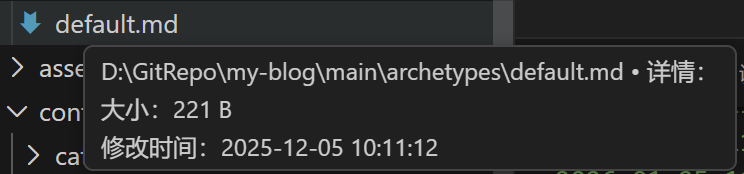
文件信息:悬浮在文件上时,显示文件的详细信息,支持所有文件类型。
-
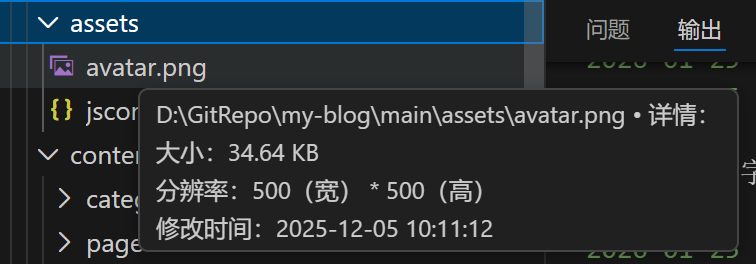
媒体文件元信息展示:对于媒体文件做了特殊优化,可以读取其元信息,如图片的分辨率(当前版本只支持图片,日后会逐渐加入更多媒体文件类型)。
-
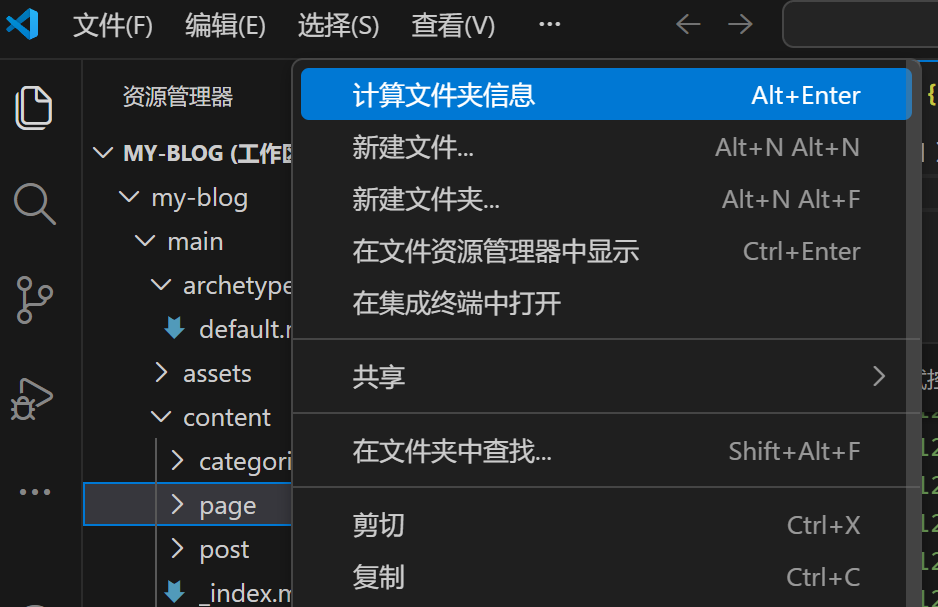
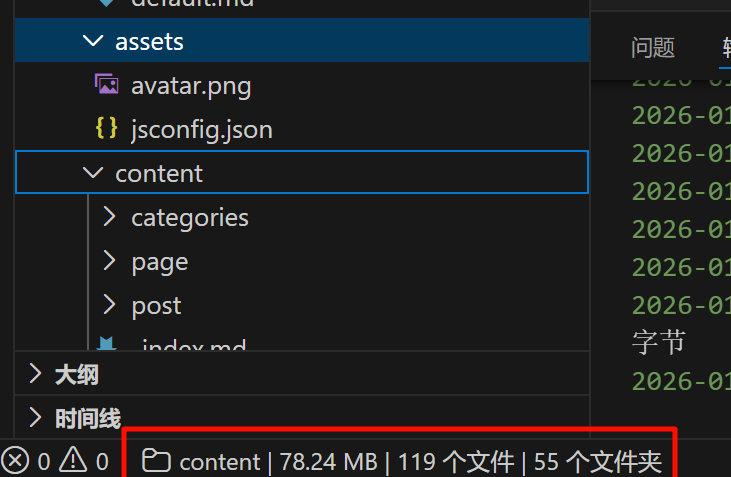
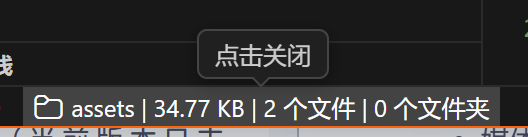
文件夹大小计算:可以计算文件夹的总大小,支持通过右键菜单或快捷键触发计算,并在状态栏显示结果(结果默认显示 60 秒,可以通过点击来关闭,设置中可调节)。
-
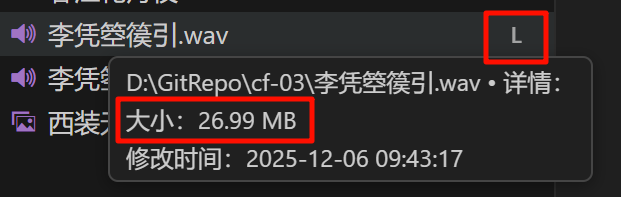
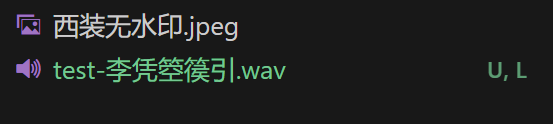
大文件标注:对于大文件,会用类似 Git 扩展的样式进行标识(追加一个 L 标志,可以和 Git 标志共存),方便用户识别,和 Git 的集成性非常好。假如您的工作区是 Git 仓库,这将有效提示用户,避免误提交大文件。纵使您不使用 Git 仓库,该标识也有助于您识别大文件。默认显示 L 的阈值是 20 MB/MiB,可以在设置中调整。
配置选项
您可以在 VSCode 的设置中搜索 tree-enhancer 来定位到本扩展的配置选项。本扩展的配置选项说明详尽而清晰,您可以根据需要进行调整。
贡献与本地化
欢迎任何形式的贡献,尤其是本地化支持。
如需添加新的语言:
- 请复制
package.nls.json文件,创建您所在区域的语言文件(如package.nls.de.json或package.nls.zh-cn.json),翻译文件中的键值对中的所有值 - 复制
l10n目录下的bundle.l10n.json文件,创建您所在区域的语言文件(如bundle.l10n.de.json或bundle.l10n.zh-cn.json),翻译文件中的键值对中的所有值 - 通过 Issue 或 Pull Request 提交
为什么要开发此扩展
查看文件的信息、属性、文件夹信息是日常生活中的高频操作,但 VSCode 默认的资源管理器树并不支持这些功能。虽然可以通过定位到资源管理器,再右键菜单查看文件属性,但这需要多次点击,且不够直观。VSCode 默认的悬浮提示只展示无关紧要的信息,这没有充分利用到这一操作,是一种浪费。对于本扩展旨在通过悬浮提示的方式,快速、直观地展示文件和文件夹的关键信息,提升用户的工作效率。
EnglishVersion
Feature Demonstration
-
File Information: When hovering over a file, its detailed information is displayed, supporting all file types.
-
Media File Metadata Display: Special optimization is made for media files to read their metadata, such as image resolution (only images are supported in the current version; more media file types will be added gradually in the future).
-
Folder Size Calculation: The total size of a folder can be calculated. The calculation can be triggered via the right-click menu or shortcut keys, and the result is displayed in the status bar (the result is shown for 60 seconds by default, which can be closed by clicking and adjustable in settings).
-
Large File Marking: Large files are identified in a style similar to Git extensions (an “L” flag is appended, which can coexist with Git flags), making it easy for users to recognize them with excellent Git integration. If your workspace is a Git repository, this will effectively remind you to avoid accidentally committing large files. Even if you do not use a Git repository, this flag still helps you identify large files. The default threshold for displaying the “L” flag is 20 MB/MiB, which can be adjusted in settings.
Configuration Options
You can search for tree-enhancer in VSCode Settings to locate the configuration options of this extension. The configuration options of this extension are detailed and clear, and you can adjust them as needed.
Contribution and Localization
Contributions in any form are welcome, especially localization support.
To add a new language:
- Copy the
package.nls.jsonfile and create a language file for your region (e.g.,package.nls.de.jsonorpackage.nls.zh-cn.json), then translate all values in the key-value pairs of the file. - Copy the
bundle.l10n.jsonfile in thel10ndirectory and create a language file for your region (e.g.,bundle.l10n.de.jsonorbundle.l10n.zh-cn.json), then translate all values in the key-value pairs of the file. - Submit via Issue or Pull Request.
Why This Extension Was Developed
Checking file information, attributes, and folder details are high-frequency daily operations, but VSCode’s default Explorer tree does not support these functions. Although you can view file properties through the right-click menu after locating the Explorer, this requires multiple clicks and is not intuitive enough. VSCode’s default hover tips only display insignificant information, which underutilizes this interaction and is a waste. This extension aims to quickly and intuitively display key information about files and folders through hover tips, improving your work efficiency.