文件树增强(Tree Enhancer)
一款轻量级、高性能的 VS Code 扩展,用于增强原生文件资源管理器。通过悬停操作即时显示文件与目录的详细元数据,如大小、子项计数等。
重要说明:首次安装后,请务必重启 VS Code。本扩展内置了国际化(i18n)支持,重启操作将确保 VS Code 正确加载本地化语言资源。目前支持的语言包括:英文(en)和简体中文(zh-cn)。下方演示中的所有 UI 元素均已适配多语言(例如,中文“大小”字段在英文环境下将显示为“Size”)。
功能演示
-
文件大小显示:悬浮在文件上时,显示文件的大小,支持所有文件类型。
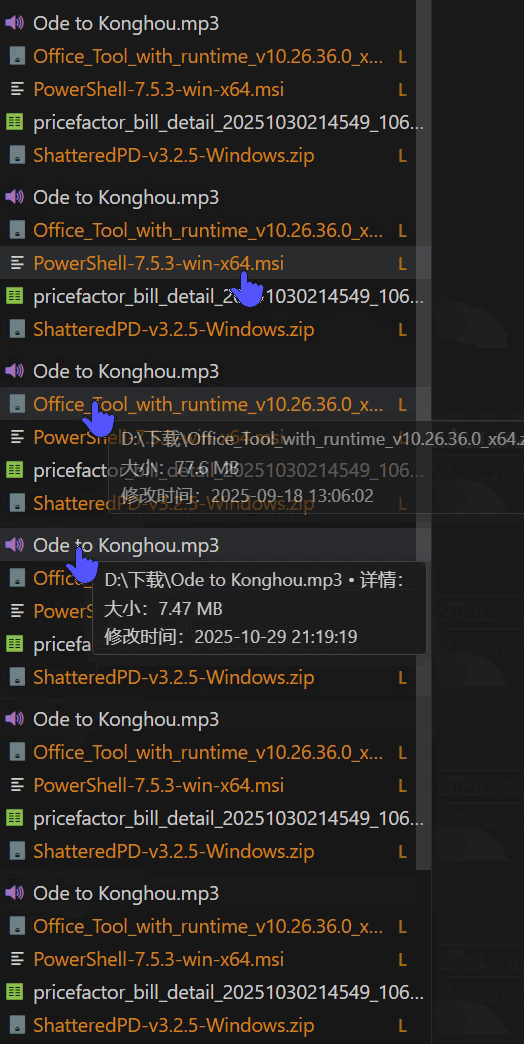
-
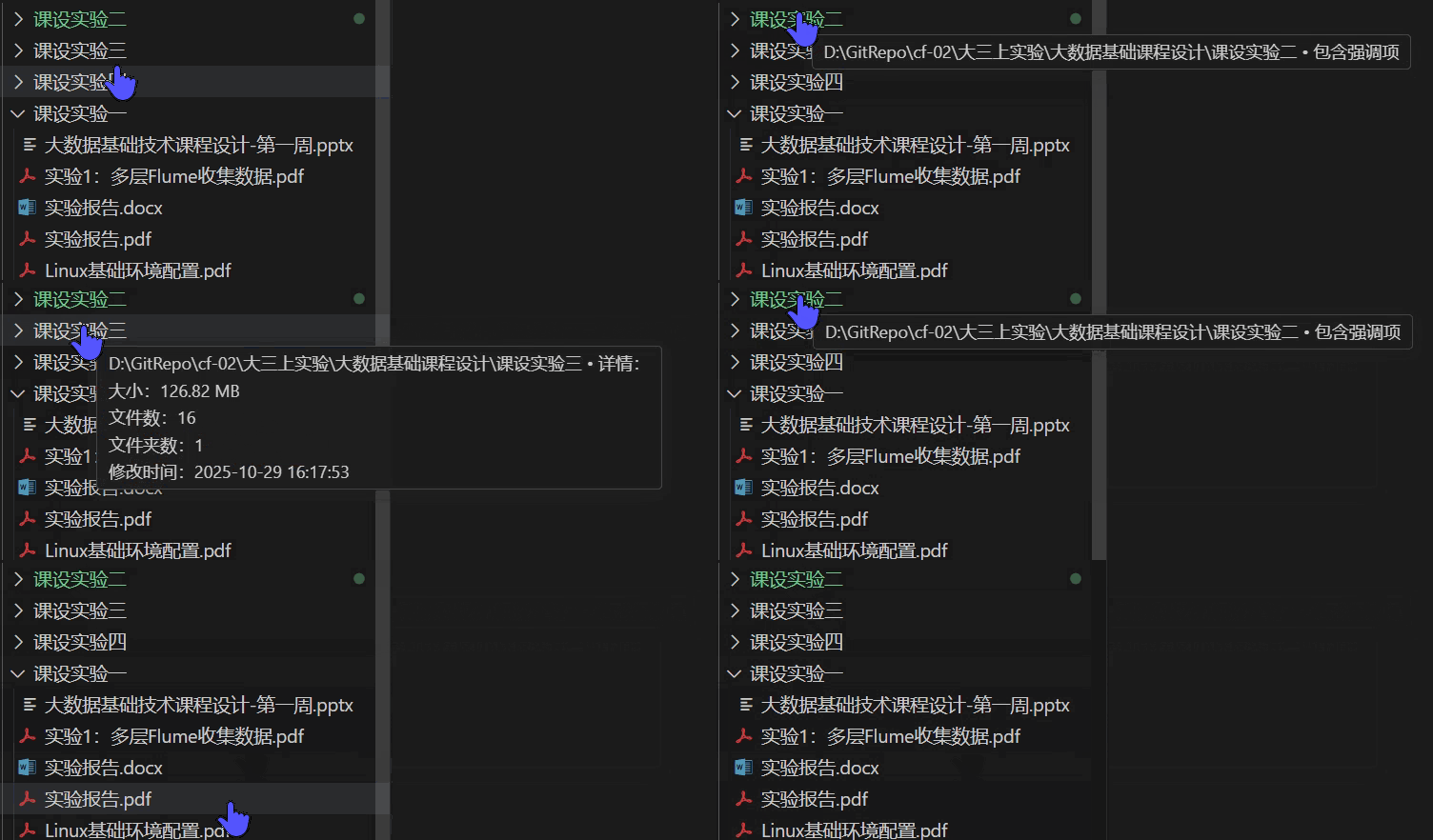
文件夹详情显示:悬浮在文件夹上时,显示文件夹的总大小、包含的文件数量和子文件夹数量。
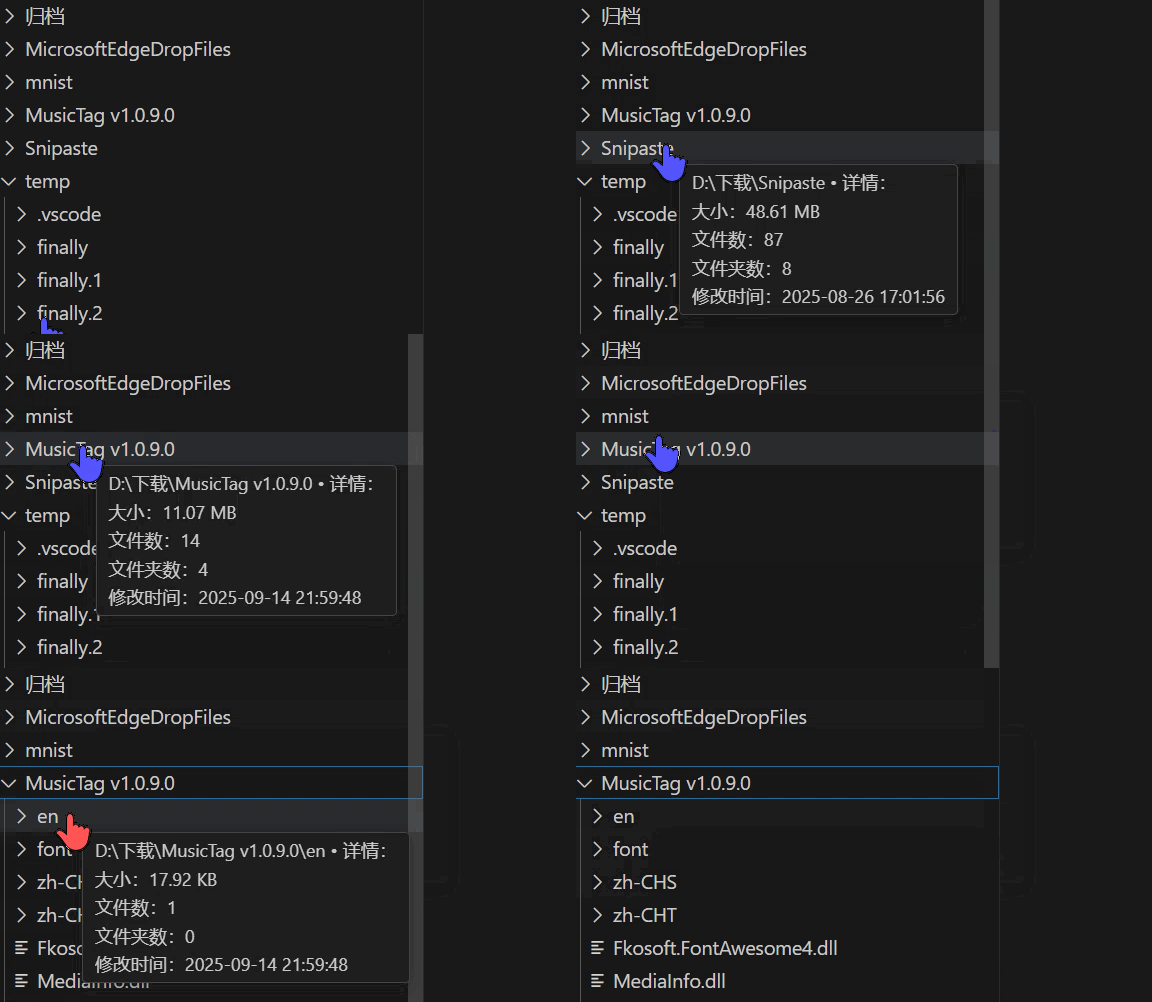
-
媒体文件元信息展示:对于媒体文件做了特殊优化,可以读取其元信息,如图片的分辨率(当前版本只支持图片,日后会逐渐加入更多媒体文件类型)。
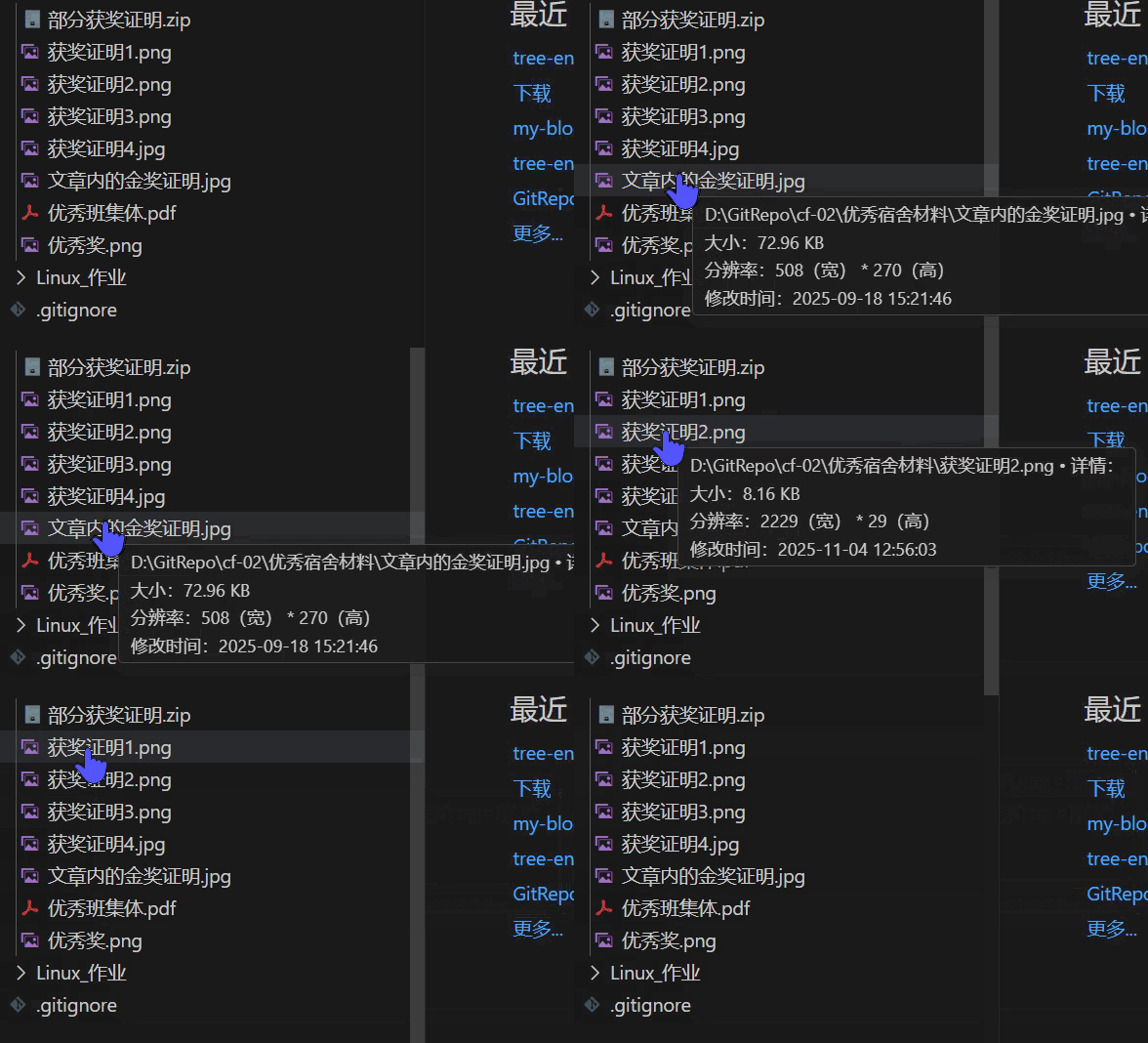
-
大文件标注:对于大文件,会用类似 Git 扩展的样式进行标识(追加一个 L 标志,可以和 Git 标志共存),方便用户识别,和 Git 的集成性非常好。假如您的工作区是 Git 仓库,这将有效提示用户,避免误提交大文件。纵使您不使用 Git 仓库,该标识也有助于您识别大文件。
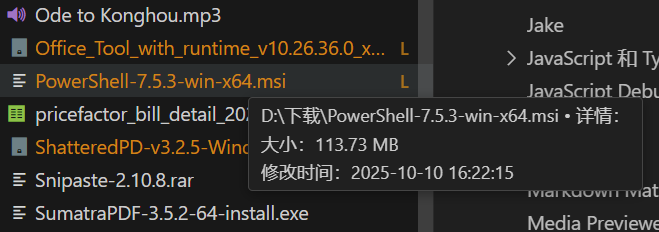
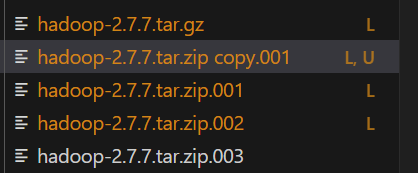
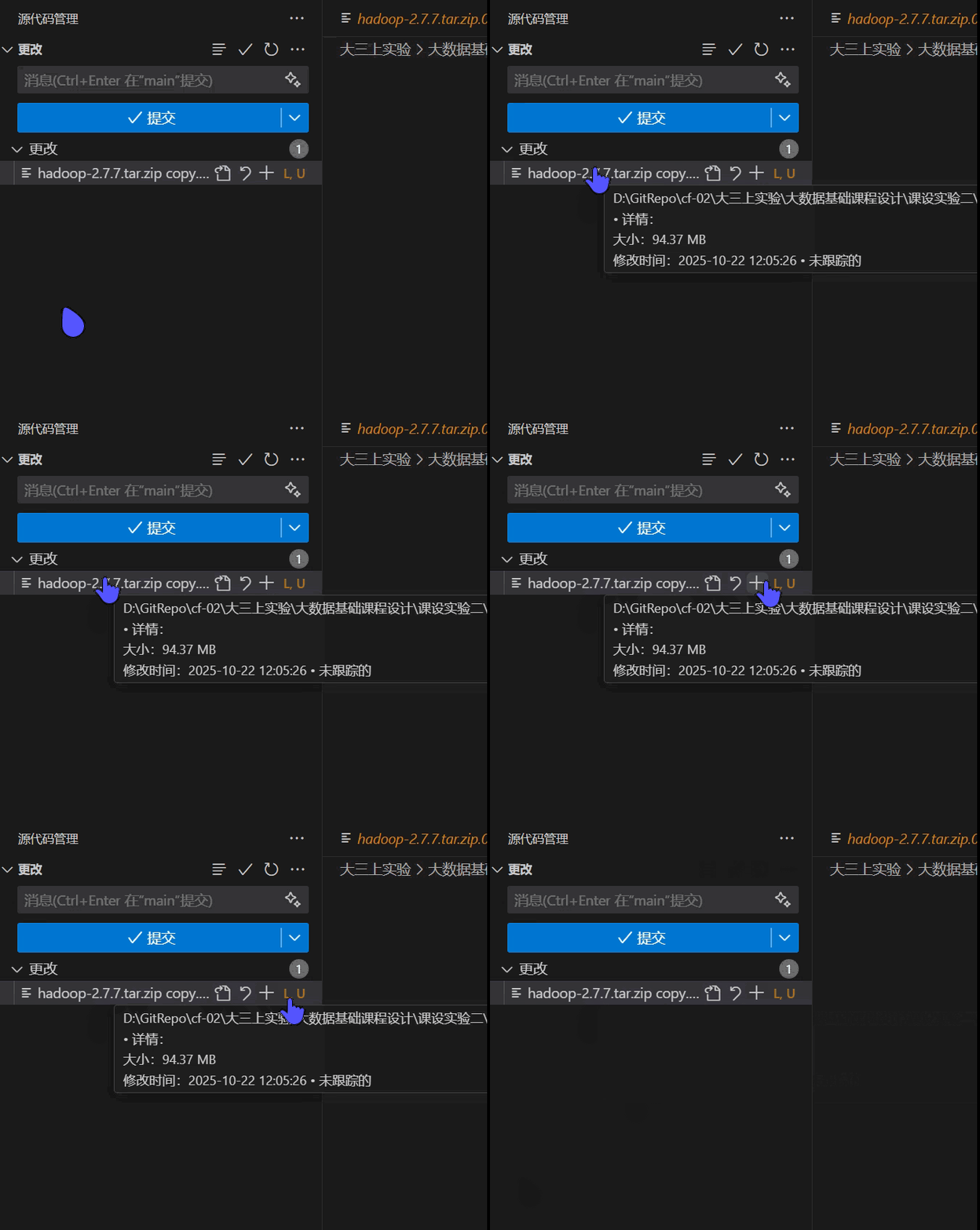
请注意和 Git “U” 标志共存的 “L” 标志。
配置选项
您可以在 VS Code 的设置中搜索 tree-enhancer 来定位到本扩展的配置选项。本扩展的配置选项说明详尽而清晰,您可以根据需要进行调整。配置选项完整支持本地化,您可以在不同语言环境下看到相应语言的配置说明。
已知问题
-
当目录中包含错误、警告、高优先级提示(VS Code 显示“包含强调项”)时,该高优先级提示将覆盖本扩展的悬停信息。这是 VS Code 自身的机制,目前暂无解决方案。待“包含强调项”状态解除后,本扩展功能将自动恢复。
性能优化
本扩展在设计上严格遵循性能优先原则,实施了多项优化策略:
- 异步执行:所有文件和目录的 I/O 计算均在异步任务中执行,避免阻塞 UI 线程。
- 超时中断:默认配置下,若单次计算(如大目录遍历)耗时超过 100 毫秒,将自动中断,防止资源过度占用。
- 智能缓存:计算结果将被缓存。只要文件的 mtime(最后修改时间)未发生变化,将直接使用缓存数据,杜绝冗余计算。
若您发现了性能问题,请随时提交 Issue 反馈。
贡献与本地化
欢迎任何形式的贡献,尤其是本地化支持。如需添加新的语言,请复制 package.nls.json 文件,创建您所在区域的语言文件(如 package.nls.de.json 或 package.nls.zh-cn.json),翻译文件中的值,并通过 Issue 或 Pull Request 提交。
为什么要开发此扩展
查看文件的信息、属性、文件夹信息是日常生活中的高频操作,但 VS Code 默认的资源管理器树并不支持这些功能。虽然可以通过定位到资源管理器,再右键菜单查看文件属性,但这需要多次点击,且不够直观。VS Code 默认的悬浮提示只展示无关紧要的信息,这没有充分利用到这一操作,是一种浪费。对于本扩展旨在通过悬浮提示的方式,快速、直观地展示文件和文件夹的关键信息,提升用户的工作效率。
开发者信息
蛋卷儿(EggRoll)
EnglishVersion
Tree Enhancer
A lightweight, high-performance VS Code extension designed to enhance the native file explorer. Instantly display detailed metadata of files and directories (such as size, item count, etc.) through hover actions.
Important Note: After the first installation, please restart VS Code without fail. This extension has built-in internationalization (i18n) support, and the restart ensures that VS Code loads the localized language resources correctly. Currently supported languages include: English (en) and Simplified Chinese (zh-cn). All UI elements in the demonstrations below are adapted for multiple languages (for example, the Chinese field “大小” will display as “Size” in the English environment).
Feature Demonstrations
-
File Size Display: Hover over a file to show its size, supporting all file types.
-
Folder Details Display: Hover over a folder to show its total size, number of contained files, and number of subfolders.
-
Media File Metadata Display: Specialized optimization for media files allows reading their metadata, such as image resolution (only images are supported in the current version; more media file types will be gradually added in the future).
-
Large File Marking: Large files are identified with a style similar to Git extensions (appending an “L” marker that can coexist with Git markers), making it easy for users to recognize. The integration with Git is excellent. If your workspace is a Git repository, this will effectively remind users to avoid accidentally committing large files. Even if you don’t use a Git repository, this marker helps you identify large files.
Please note the “L” marker coexisting with Git’s “U” marker.
Configuration Options
You can search for tree-enhancer in VS Code’s settings to locate the configuration options for this extension. The configuration options of this extension are detailed and clear, allowing you to adjust them as needed. The configuration options fully support localization, so you can see the configuration descriptions in the corresponding language under different language environments.
Known Issues
-
When a directory contains errors, warnings, or high-priority notifications (VS Code displays “Contains emphasis items”), the high-priority notification will override the hover information of this extension. This is VS Code’s own mechanism, and there is currently no solution. Once the “Contains emphasis items” status is lifted, the extension’s functionality will automatically resume.
Performance Optimization
This extension strictly adheres to the principle of performance first in design and implements multiple optimization strategies:
- Asynchronous Execution: All I/O calculations for files and directories are performed in asynchronous tasks to avoid blocking the UI thread.
- Timeout Interruption: By default, if a single calculation (such as traversing a large directory) takes more than 100 milliseconds, it will be automatically interrupted to prevent excessive resource usage.
- Intelligent Caching: Calculation results are cached. As long as the mtime (last modification time) of the file has not changed, the cached data will be used directly to eliminate redundant calculations.
If you encounter any performance issues, please feel free to submit an Issue for feedback.
Contribution and Localization
Contributions of any kind are welcome, especially for localization support. To add a new language, please copy the package.nls.json file, create a language file for your region (such as package.nls.de.json or package.nls.zh-cn.json), translate the values in the file, and submit it via Issue or Pull Request.
Why Develop This Extension
Checking file information, properties, and folder details is a frequent operation in daily work, but VS Code’s default explorer tree does not support these functions. Although you can navigate to the explorer and then right-click to view file properties, this requires multiple clicks and is not intuitive enough. VS Code’s default hover tooltip only displays irrelevant information, which is a waste of this operation. This extension aims to quickly and intuitively display key information about files and folders through hover tooltips, improving user work efficiency.
Developer Information
EggRoll